Working with Fender Notion Software
Fender Notion is our musical notation application for macOS, Windows, and mobile devices. With Fender Notion, you can create full-fledged musical scores for composing new work or transcription of existing music. Fender Notion can exchange note data freely with Fender Studio Pro. Together, they create an ideal tool set for fusing the worlds of composition and production in your musical projects.
You can directly transfer data between any device on the same network (regardless of platform) that is running Fender Notion or Fender Studio Pro.
This section describes the workflow for sending data between Fender Studio Pro and Fender Notion.
Sending from Studio Pro to Notion
In Fender Studio Pro, when you have a Session open that you wish to send to Fender Notion, navigate to Session/Send to Notion to bring up the "Send to Notion" window. In this window, you have the following choices:
- Computer Selector: This lets you choose to send data to an instance of Fender Notion running on your own computer ("This Computer"), or to a Fender Notion instance on another computer or device on your network. If any computers currently running Fender Notion are on your network, they are listed in this drop-down menu for access.
- Send Note Data of Entire Session: This option sends the note data for all Instrument Tracks in the current Session to the chosen instance of Fender Notion. A new Score is created in Fender Notion, with instrument parts that mirror the Instrument Tracks in your Fender Studio Pro Session.
- Send Note Data of Selected Tracks: This option works similarly to the option above, but only sends note data from the currently selected Instrument Tracks in Fender Studio Pro.
- Send Audio Mixdown (Legacy feature exclusive to PreSonus Notion 6 desktop): This option mixes your Session down to a stereo wav file, and sends the file to PreSonus Notion 6 desktop, where it attaches the audio file to a new Score.
- Create lead sheet: If you have chords in your Chord Track, you can check the box in the dialog to apply lead sheet formatting to imported note data.
- Merge into open document: Select this option whether to merge into an existing document (overwriting a previous transfer) or to create a new document.
You can also send audio files to PreSonus Notion 6 desktop from the Browser in Fender Studio Pro. To do so, [Right]/[Ctrl]-click the audio file, choose "Send to Notion" from the pop-up menu, and follow the on-screen instructions to complete the action. This option is available for 16-bit/44.1 kHz WAV files only.
Note that upon sending data to Fender Notion, Fender Studio Pro also sends tempo map information, ensuring that tempo and time signature changes remain in sync between the two applications.
Sending from Notion Mobile to Fender Studio Pro
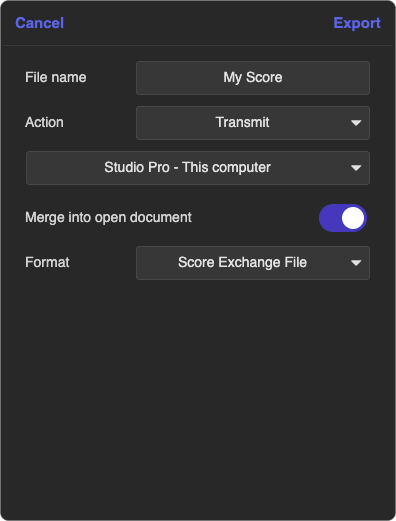
In Notion Mobile, if you have a Score open that you wish to send as score data, MIDI or rendered audio to Fender Studio Pro, navigate to the Export options from the Application Menu or press Ctrl+E to open the Export window.
From this window, you have the following choices:
-
Action: Select Transmit from the drop-down options.
-
Computer Selector: This lets you choose to send score, MIDI & audio to an instance of Fender Studio Pro running on your own computer ("This Computer"), or to a Fender Studio Proinstance on another computer on your network. If any computers currently running Fender Studio Pro are on your network, they are listed in this drop-down menu for access.
-
Merge into open document: Select this option whether to merge into an existing Session (overwriting a previous transfer) or to create a new document.
-
Format: From this menu, you can pick between several formats that you can Transmit to Fender Studio Pro, including Score Exchange, MIDI, and Wave files.
Updating Audio and MIDI Between Fender Studio Pro and Fender Notion
If you've already transferred notes or audio between Fender Studio Pro and Fender Notion, and something is changed in either program, feel free to follow the sending procedure again using the merge function. Repeating the sending procedure from the application in which the change was made to the other application updates all previously sent notes and audio files to match the new information.
Sending a Session from Fender Studio Pro to Fender Notion also sends Lyrics in your Lyrics Lanes, but not Global Lyrics Track content. When sending a Fender Notion project to Fender Studio Pro, lyrics can be fully edited in Fender Studio Pro.